PRODUCT INFORMATION
Product Overview
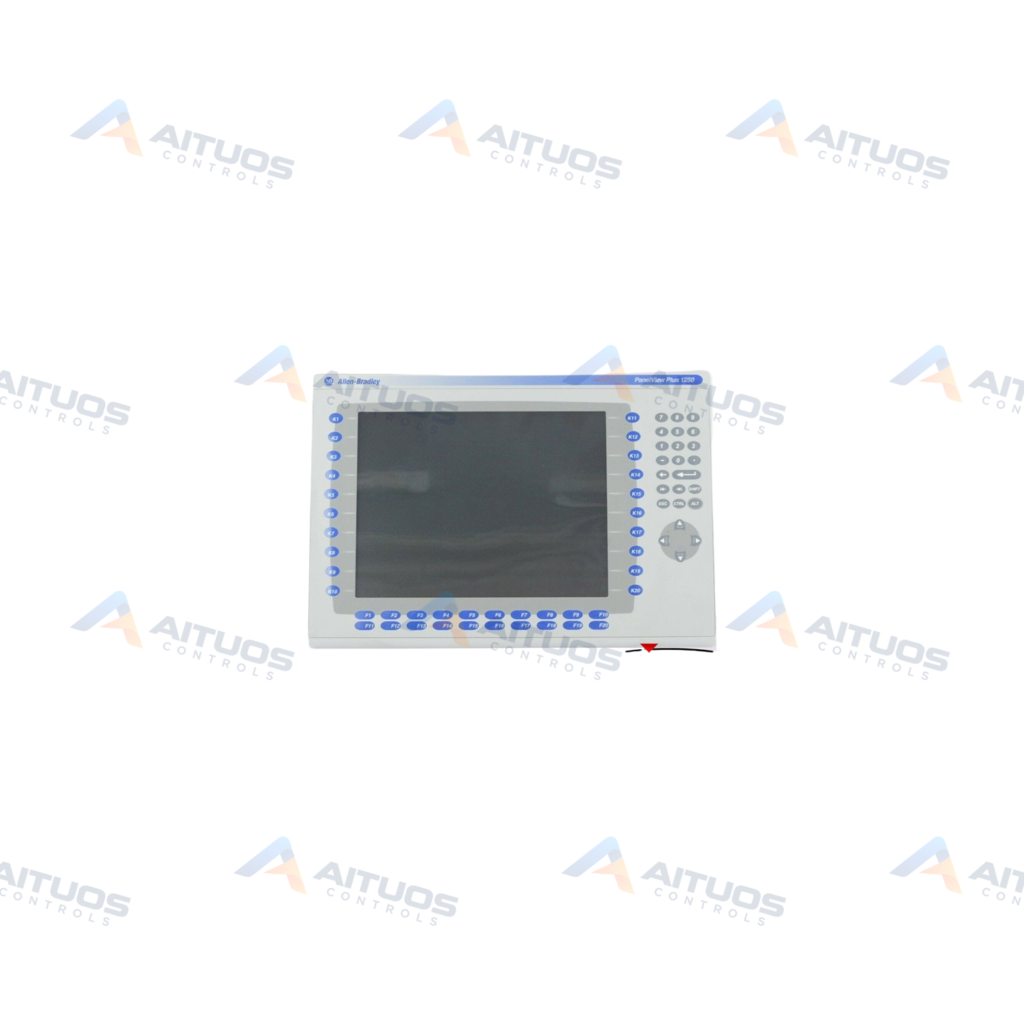
The Allen-Bradley 2711P-RDB12C is a PanelView display module for industrial operator interface assemblies. It serves as a replacement display for PanelView Plus 1250 and PanelView Plus 6 1250 terminals. The unit combines an analog resistive touch screen with a full tactile keypad. The keypad provides navigation, numeric inputs, and functional keys from F1 through F20 and K1 through K20.
This assembly incorporates a 12.1-inch active matrix color TFT liquid crystal display. The display delivers an 800 by 600 pixel resolution with 18-bit color graphics support. Its effective display area measures 246 by 184 millimeters, producing a luminance of 300 nits. Operators can calibrate the screen and adjust display brightness directly within terminal configuration settings.
TECHNICAL DATA
Technical Specifications
| Parameter | Specification |
|---|
| UPC | 662073080510 |
|---|
| Weight | 5.38 lbs (2.44 kg) |
|---|
| Display Type | Color active matrix, thin-film transistor (TFT) with liquid crystal display (LCD) |
|---|
| Display Area | 246 x 184 mm (9.7 x 7.2 in.) |
|---|
| Resolution | 800x600 pixels |
|---|
| Compatibility | PanelView Plus 1250 / PanelView Plus 6 1250 Touch and Keypad Terminals |
|---|
| Display Size | 12.1 inches |
|---|
| Display colors | 18-bit color graphics |
|---|
| Anti-Glare overlay | not included |
|---|
| Luminance | 300 cd/m2 (Nits)(3) |
|---|
| Keypad | F1 to F20; K1 to K20; Numeric; Navigation |
|---|
| Touch Input | Analog Resistive; 1 Million actuations |
|---|
| Accessory for | 1250 Terminal |
|---|
| Input Type | Keypad/Touch |
|---|
| Display | 12 in. Color |
|---|
TECHNICAL INFORMATION
Features
- Features a 12.1-inch color active matrix TFT LCD panel.
- Provides native SVGA resolution of 800 by 600 pixels.
- Supports 18-bit color graphics presentation.
- Combines analog resistive touch input with dedicated function and numeric keys.
- Delivers display luminance rated at 300 cd/m2.
- Touch screen interface rated for one million actuations.
TECHNICAL INFORMATION
Applications
- Replacement visualization hardware for PanelView Plus 1250 operator terminals.
- Operator interface servicing on PanelView Plus 6 1250 keypad and touch stations.
TECHNICAL INFORMATION
Installation Guidelines
- Operate the display module using a gloved finger or an approved stylus.
- Keep operator hands free from oil, grease, dust, and corrosive chemicals during operation.
- Clean the front surface using a soft cloth dampened with mild soap and isopropyl alcohol.
- Install optional HMI window kits when additional physical protection or access restriction is required.
TECHNICAL INFORMATION
Configuration Guidelines
- Adjust screen brightness and contrast via terminal display configuration parameters.
- Perform touch screen calibration during initial commissioning or following physical replacement.
TECHNICAL INFORMATION
Compatibility
- Compatible with Allen-Bradley PanelView Plus 1250 touch and keypad terminals.
- Compatible with Allen-Bradley PanelView Plus 6 1250 touch and keypad terminals.
TECHNICAL INFORMATION
Lifecycle / Replacement Information
- Replace the module if the display fails to illuminate at maximum brightness settings.
- Replace physically cracked or unresponsive touch screen components immediately.
COMPATIBILITY
Compatibility & Replacement
COMPATIBLE MODELSCompatible with Allen-Bradley PanelView Plus 1250 touch and keypad terminals. Compatible with Allen-Bradley PanelView Plus 6 1250 touch and keypad terminals.
Verify compatibility against the exact Part Number, revision and manufacturer documentation before ordering.
PART VERIFICATION
Before You Order
Industrial automation parts can share similar model names, suffixes and revisions. Confirm the complete manufacturer Part Number before purchase.
01Check Part NumberMatch the complete ordering code on the existing unit.
02Confirm RevisionCheck suffix, hardware or firmware when applicable.
03Send a Label PhotoWe can review a clear label photo when identification is uncertain.
ORDERING PROCESS
From RFQ to Dispatch
1Submit Part Number2Verify Product Identity3Confirm Stock & Condition4Issue Quotation5Dispatch & Tracking
PRODUCT FAQ
Frequently Asked Questions
Which terminals are compatible with the Allen-Bradley 2711P-RDB12C?
The 2711P-RDB12C is compatible with Allen-Bradley PanelView Plus 1250 and PanelView Plus 6 1250 keypad and touch terminals.
What operator input options does the 2711P-RDB12C display module include?
It provides an analog resistive touchscreen alongside function keys F1 through F20, K1 through K20, and numeric keys.
How should the screen of the 2711P-RDB12C be cleaned?
Clean the screen surface with a soft cloth moistened with mild soap and isopropyl alcohol.
When does the 2711P-RDB12C display module require replacement?
Replace the unit if it sustains physical damage or cannot display graphics at maximum brightness settings.